
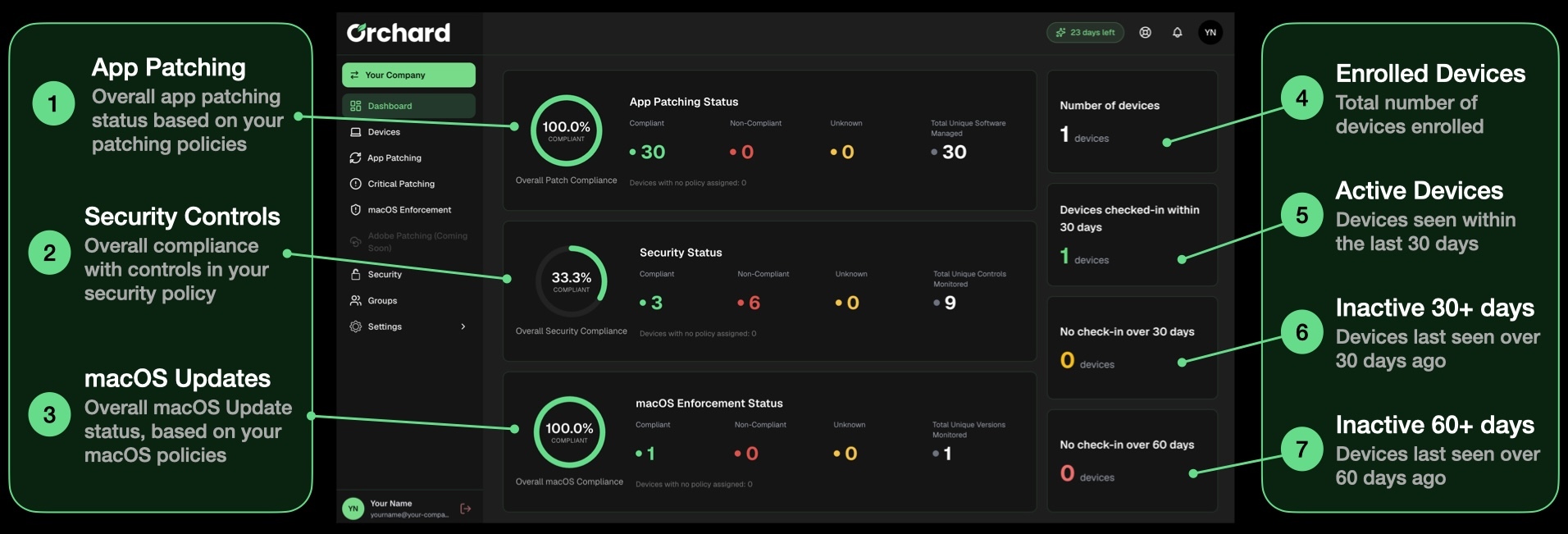
The Orchard dashboard provides you with a high-level overview of your App patching, Security and macOS update status across your enrolled Macs.
Below are the key items available on the dashboard:
App Patching
Note: In the case of app patching, an app is considered compliant if it is on at least the expected version. The expected version is the version that was enforced at the end of the last patching cycle.
- Compliance Percentage: Showing the overall compliance percentage based on all patches across your enrolled devices
- Compliant vs Non-compliant: Showing you the number of compliant apps vs non-compliant apps
- Total unique apps: This is the count of unique application titles found across all enrolled devices
Security Controls
Data in the Security Controls section is based on the controls you have defined in your security policy.
- Compliance Percentage: This shows you the total percentage of security controls that are in a compliant state, vs non compliant state
- Compliant vs Non-compliant: Showing you the number of individual security controls that are currently in a compliant or non-compliant state
- Total unique controls: This is the count of unique security controls that are defined across all of your security policies
macOS Updates
Note: The macOS version on a device being in a compliant state means that it has no pending macOS update that is currently overdue, defined in your macOS patching settings.
- Compliance Percentage: This shows you the total percentage of macOS versions that are in a compliant state, vs non compliant state
- Compliant vs Non-compliant: Showing you the number of macOS versions that are currently in a compliant or non-compliant state
- Total unique controls: This is the count of unique macOS versions that are currently being monitored
Enrolled Devices
This section is showing you the count of currently enrolled devices, regardless of the last check-in date.
Active Devices
This section shows you the count of devices that have checked in to the Orchard platform within the last 30 days.
Inactive 30+ days
This is a count of devices that haven't reported in to the Orchard platform for more than 30 days. We would recommend checking these devices periodically to determine whether they aere still in use.
Inactive 60+ days
This is a count of devices that haven't reported in to the Orchard platform for more than 60 days. We would recommend checking these devices periodically to determine whether they aere still in use.